
Reading PWM with the IFI & a Basic Stamp (Robots)
 <
<
As part of the ongoing effort to improve Red Menace, I wanted to be able to directly read the Gyro, and use the IFI controller to process the gyro output.
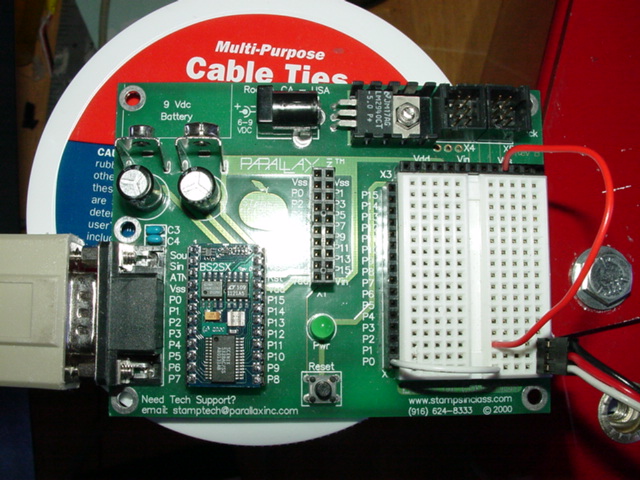
So, cribbing from my old ultrasonic code, I hooked up a Basic Stamp Board of Education to one of the IFI outputs (white = signal, black = gnd, and red = +5V if you're feeding it into the IFI), and wrote some code to measure the length of the pulse and send it out over the program/debug port. Seems to work fine, but more testing is going to be needed. The following code is hopefully self-explanatory, enjoy!
' PROGRAM:    BS2SX PWM Read Test
' Written by: Robert J Woodhead
' Date:       20 SEP 02
'
' Define BS2-SX Project Files
'
' {$STAMP BS2SX}
'
' Reads an incoming PWM signal, converts it to fracBase
' coordinates, outputs it as a packet ($FF,value) over
' the program/debug port.
'
' fracBase is the internal coordinate system used by my
' other code.  Instead of using 0..255 as is normal
' with a lot of IFI code, I use 0..250 to avoid overflow
' problems.  This also avoids the deadly 255 value being
' sent to the victors.  You can change fracBase to 256 if
' you want, it's entirely up to you.  However, using a
' smaller range lets you use an out-of-range value (I use
' fracBase+1) as a signal that means "no valid data"
'
' Another nice effect is that since 0..250 has an odd
' number of steps, the central step (125) is the true
' center of the range.
fracBase	con	250		' fractional range base, same as driver code
fracHalf	con	125		' half of fracBase
fracBaseP1	con	fracBase+1	' utility constants
fracHalfP1	con	fracHalf+1
' From empirical testing, I've found out the minimum and
' maximum pulse length (probably need to test it again
' to make sure).  From these numbers, I can precompute
' some constants to make the math go faster
minPulse	con	1120				' minimum pulse width
maxPulse	con	2658				' maximum pulse width
maxPulseM1	con	maxPulse - 1		' useful to have -1 value
rngPulse	con	maxPulse - minPulse	' max pulse range
badPulse	con	500				' bad pulse threshold
' In order to do precise math, when scaling from the pulse
' range to the fracBase range, I use a trick.  In order to
' avoid integer truncation problems, I first multiply the
' 0..rngPulse pulse width by some number greater than
' (rngPulse / fracBase), then divide it out again later.
' This in effect lets me do division with a fractional
' component.  As long as this multiplier is such that
' rngPulse * multipler < 65536, we'll never get an overflow.
'
' Since rngPulse is about 1500, as long as this number is
' above 6, and below about 40, we will get the desired
' accuracy.  I picked 32 because it's a number with only one
' 1 bit, and thus multiplies faster.
mulPulse	con	32
divPulseM	con	mulPulse * rngPulse
divPulse	con	divPulseM / fracBase
' So, the pulse, scaled to 0..rngPulse-1, multipled by
' mulPulse and then divided by divPulse, gives us our
' final value.
pulse		var	word				' the actual pulse
result	var	byte				' massaged result
' Right now, for testing, I actually output human readable
' text to the debug port.  In the final working code, these
' will be removed.
debug 0	' clear the screen
' Main loop.  Read PWM, display results
main:
	' Read a pulse from input line 0, low->high start,
	' and store the length in pulse
	pulsin 0,1,pulse
	' If no pwm received, indicate error (fracBase+1)
	if pulse <= badPulse then p_bad:
	' Pin results to the known good range.  I max out
	' at maxPulse - 1 to avoid "going over the top"
	' problems when doing the scaling.
	pulse = (pulse max maxPulseM1) min minPulse
	' Scale the pulse to 0..fracBase.
	result = ((pulse - minPulse)* mulPulse) / divPulse
	goto send_packet:
p_bad:
	' Set to our arbitrary "bad pulse" value
	result = fracBaseP1
send_packet:
	' Human readable output (home, output original and scaled
	' result, erase to end of line
	debug 1,dec5 pulse," ",dec3 result,11
	' Code you'd use to send to the basic stamp inside the
	' IFI.  You just connect the program/debug port of the
	' IFI to the program/debug port of your sensor manager
	' stamp (running this code).
	'
	' Amusingly, serout 16,16224 is the same as debug, but
	' it looks cooler this way.

'	serout 16,16624,[ $FF,result ]			' send packet
	' How the comm link works:
	'
	' This code is going to send out, without handshaking,
	' byte pairs a couple of hundred times a second.
	'
	' On the receiving end, in the code running on the IFI,
	' you have the following statement:
	'
	' serin 16,16624,50,timeout,[ WAIT($FF),STR pwm\1 ]
	'
	' This waits until it sees a $FF byte, then reads 1
	' byte into byte variable pwm.  If it doesn't finish
	' within 50 msec (1/20 second), it jumps to label
	' timeout.
	'
	' That timeout is probably generous, you can probably
	' reduce it (haven't done testing yet).
	'
	' The cute thing is that because the packet starts with
	' $FF, and because the data byte can't be bigger than
	' 251 (and thus, never $FF), even if the serin starts
	' reading in the middle of the send of a packet, there's
	' no combination of data bytes [or start/stop bits] that
	' can generate a $FF byte.  So the serin will simply
	' keep waiting until it sees the next packet.  You can
	' create, send and add a checksum if you want.  If you
	' do more complex stuff (I did some code reading 8
	' ultrasonic rangefinders) you can send multibyte packets
	' as well.  It's a lot cleaner than trying to generate
	' a voltage for the IFI to convert back into a digital
	' value.
	'
	' Note also that you can do some preprocessing in this
	' basic stamp.  In my ultrasonic code, what got sent to
	' the IFI was not the raw readings, but a massaged and
	' filtered driving recommendation, in the form of two
	' virtual joystick values!
	goto main: